When a family sits down to make a biodata for their son or daughter, the first instinct is usually Microsoft Word. Someone finds a template online, types over it, and emails it to relatives. It works, more or less — but when that document arrives on the other family's phone, it announces itself: inconsistent fonts, shifted layout, a photo that isn't quite right.
In a process where the first impression is everything, the tool you use to create the biodata matters. This guide compares the main options available in India in 2026 — honestly, including the trade-offs.
What Makes a Good Marriage Biodata Maker?
Before comparing tools, here are the criteria that matter:
- Designed for Indian matrimonial format — Has all the required sections: gotra, manglik status, time of birth, family details, about me
- Professional output — Produces a PDF that looks designed, not typed
- Photo upload — Allows a clear, well-cropped photo
- WhatsApp-ready PDF — Output is under 2MB, downloads cleanly on mobile
- Easy to use — No design skills required; guided form
- AI assistance — Helps write the About Me section (the hardest part)
- Cost — Genuinely free, or clearly priced
1. BiodataPlus — Best Overall
Best for: Anyone who wants a professional, WhatsApp-ready biodata without design skills
BiodataPlus is built specifically for Indian marriage biodatas. It is not a generic design tool adapted for biodata use — every template, every section, every default value is designed around the Indian matrimonial format.
What it gets right:
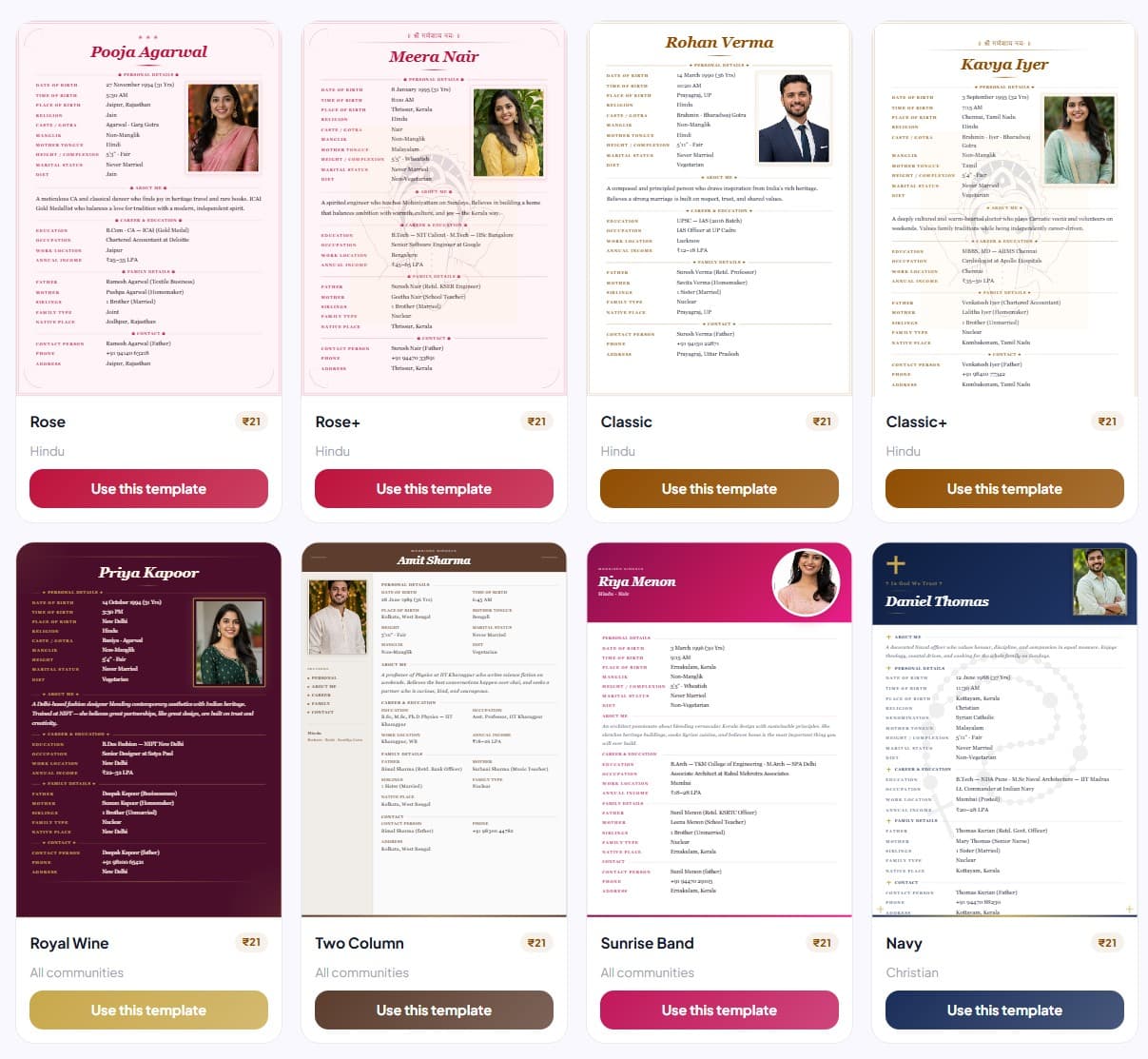
- 17 templates designed specifically for Indian matrimony — Hindu (Ganesha, Classic, Rose), Muslim (Green), Christian (Navy), modern and regional styles
- Guided conversational form walks you through every section — nothing gets missed
- AI writes the About Me paragraph — you answer 3 questions, the AI drafts it in your voice
- Photo upload with crop tool — ensures your photo looks right in the template
- Family tree on page 2 — visual representation automatically generated from your family details
- Output is a clean, print-ready PDF under 2MB — ideal for WhatsApp sharing
- Every design is free to download, family tree page included; the free PDF carries a light biodataplus.in watermark, and a watermark-free PDF costs ₹21
- Works on mobile browser — no app download required
Limitations:
- The free PDF carries a light watermark; removing it costs ₹21 (one-time)
- No offline mode — requires internet connection
Verdict: The most purpose-built option for Indian marriage biodatas. If you want a biodata that looks professional and takes under 5 minutes to create, this is the right tool.
2. Microsoft Word / Google Docs — Most Common, Worst Output
Best for: People who have already written their biodata and just want to format it
Word is the default choice for most families — and it shows. The typical Word biodata has inconsistent formatting, a photo that moves around when you edit text, and a file size that is too large for easy WhatsApp sharing.
What it gets right:
- Everyone has access to it
- Full control over content
What it gets wrong:
- No standard template for Indian matrimonial format — you start from scratch
- Formatting breaks when the file is opened on a different device or OS
- Photo placement is notoriously unreliable
- Output file size is large; PDFs exported from Word are often 3–5MB
- No AI assistance for About Me
- No family tree
Verdict: Acceptable if you have the time and design skills to format it well. For most people, the output looks like an internal HR document, not a matrimonial introduction.
3. Canva — Good Design, Wrong Product
Best for: Design-conscious users who want something visually distinctive and are willing to invest 1–2 hours
Canva has beautiful templates and full design flexibility. The problem: none of its templates are designed for Indian marriage biodatas. You would need to manually add gotra, manglik status, kundli details, and a proper family section — all from scratch.
What it gets right:
- Exceptional visual quality
- Full design control
- Free tier covers most basic needs
What it gets wrong:
- No Indian matrimonial template in the library
- No guided form — you fill everything manually in text boxes
- No AI assistance for About Me
- Easy to forget sections (no prompting for gotra, manglik status, etc.)
- Photo layout requires manual adjustment
- Steep learning curve for first-time users
Verdict: Great tool, wrong use case. If you have design experience and want a biodata that looks unlike every other template, Canva works — but plan for 1–2 hours of design time.
4. Play Store Biodata Apps — Convenient, Low Quality
Best for: Quick, informal use when a polished output is not a priority
There are dozens of biodata maker apps on the Google Play Store — most have 4+ star ratings driven by volume rather than quality. In practice, the output from most of these apps is low-resolution, compressed PDFs with generic designs that look template-heavy and unprofessional.
Common issues:
- Output is an image-based PDF (low DPI, blurry when printed)
- Limited templates — usually 5–8 heavily watermarked designs
- Watermark removal requires in-app payment
- No AI assistance; no guided form
- Photo quality is often compressed and degraded in the output
- No family tree
Verdict: Fine for a quick draft to share informally. Not suitable for a formal introduction where first impressions matter.
5. Word/PDF Templates from the Internet — Unpredictable
Best for: Budget-conscious users who want a starting point
You can find free biodata Word templates on dozens of sites. The quality varies enormously — from decent to barely usable. Common issues:
- Designed by non-Indians who don't know what sections to include (often missing gotra, manglik status, kundli data)
- Visual quality is basic
- No guidance on what to write where
- Formatting inconsistencies when edited
Verdict: Use only if you know exactly what a complete Indian marriage biodata requires and can fill it correctly without prompting. Most people miss at least 2–3 important sections when working from a blank template.
Summary Comparison
| Tool | Indian Format | Design Quality | AI About Me | WhatsApp PDF | Free Option |
|---|---|---|---|---|---|
| BiodataPlus | ✅ Purpose-built | ⭐⭐⭐⭐⭐ | ✅ Yes | ✅ Yes | ✅ Classic free |
| Microsoft Word | ✅ Manual setup | ⭐⭐ | ❌ No | ⚠️ Large files | ✅ Yes |
| Canva | ❌ Generic | ⭐⭐⭐⭐⭐ | ❌ No | ✅ Yes | ✅ Limited |
| Play Store Apps | ✅ Partial | ⭐⭐ | ❌ No | ⚠️ Low quality | ⚠️ Watermarked |
| Internet Templates | ❌ Often incomplete | ⭐⭐ | ❌ No | ⚠️ Varies | ✅ Yes |
The Bottom Line
If you want a biodata that looks professionally designed, has every required Indian matrimonial section, and is ready to share on WhatsApp in under 5 minutes — BiodataPlus is the right tool. Every design is free, and even the watermark-free PDF costs less than a cup of coffee.
If you have specific design requirements and the time to work on it, Canva produces beautiful results — but expect to spend 1–2 hours and fill in all sections manually.
For everything else: the output will look like what it is.
Related Guides
- How to Write a Marriage Biodata — complete guide to every section
- What to Include in a Marriage Biodata — Checklist — so nothing gets missed
- How to Create an Attractive Marriage Biodata — design and photo tips
- Marriage Biodata Word Format vs PDF — Which is Better? — why PDF beats Word every time
- Mobile se Biodata Kaise Banaye — phone पर बायोडेटा बनाने का तरीका
- By community: Hindu · Muslim · Christian · Marathi · Tamil · Sikh · Jain · Buddhist
- Browse All 17 Biodata Templates — see every design before you start